Norton AntiVirus Plus reviewed: what the entry tier really includes, and who needs it
This article is advertising-funded editorial. It contains partner links to Norton. If you buy a subscription after following one, BARABAS AVLST s.r.o. receives a commission from the advertiser; you pay exactly the same price as you would by going to norton.com directly. We are not affiliated with, endorsed by or sponsored by Gen Digital Inc. or Norton, and the advertiser had no sight of, or say in, this text — including the parts that tell you the product may not be worth buying. Our editorial policy sets out the rules we work to.
Norton AntiVirus Plus is the cheapest paid tier in Norton's consumer range. Most of what is written about it online describes a different, more expensive product. This piece sets out what the entry tier actually covers, what it does not, and the cases in which the protection already built into your computer makes buying it unnecessary.
Product features, device counts and storage quotas in this article were read from Norton's own public product page on 21 September 2026 and are listed under Sources. Vendors change tiers, quotas and bundles frequently, and they differ by country. Norton's own published information prevails over anything stated here in case of divergence — check the product page before you buy. If you find something on this page that is out of date or wrong, tell us and we will correct it.
What an antivirus actually does
An antivirus product has one core job with three parts. It inspects files as they arrive on your machine and compares them against what it knows about malicious software. It watches programs while they run and interrupts them if they start behaving like malware. And it updates its own knowledge continuously, because the thing it is looking for changes daily. Everything else a security suite offers — a password manager, a VPN, a backup quota, breach alerts — sits around that core rather than inside it.
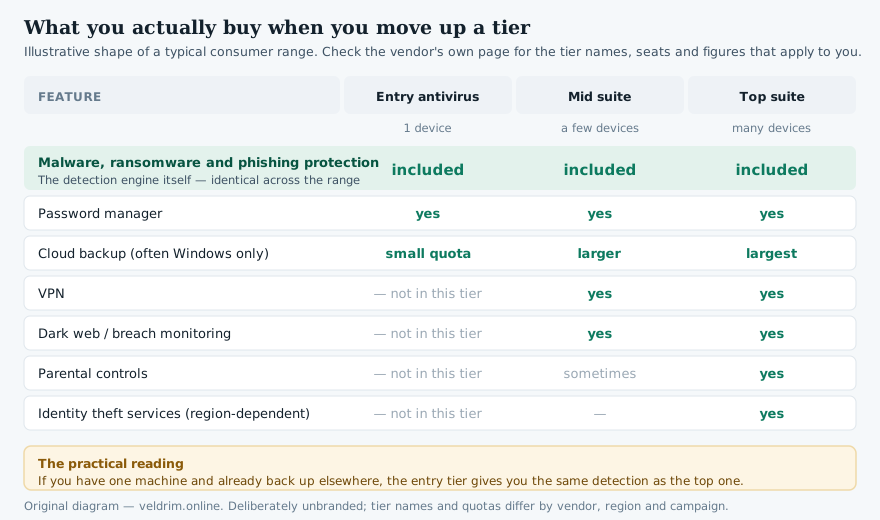
That distinction matters more than the marketing suggests, because the extras are what vendors use to differentiate their price tiers, while the detection engine is usually identical from the cheapest tier to the most expensive. If you are choosing between tiers of the same brand, you are choosing between bundles of services, not between grades of protection.
The three detection layers
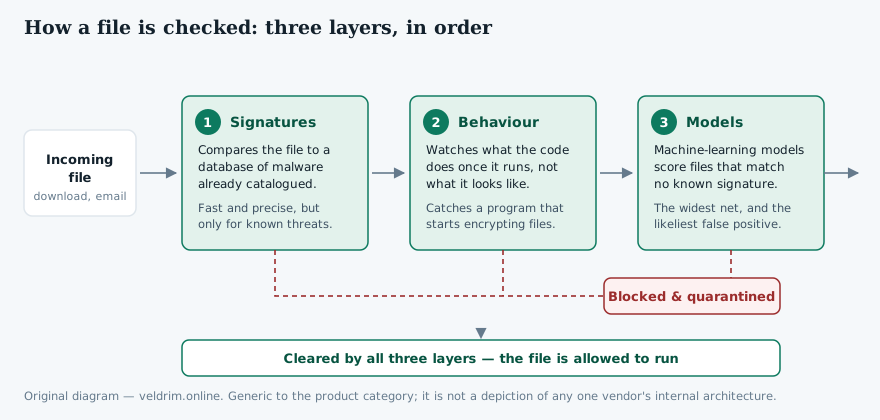
Modern engines stack three complementary techniques, each of which fails in a way the others cover.
Signature matching is the oldest and the most precise. The product holds a database of fingerprints of malware that has already been catalogued, and compares incoming files against it. It is fast and it almost never produces a false alarm, but by definition it cannot recognise something nobody has seen yet.
Behavioural monitoring ignores what a file looks like and watches what it does. A program that enumerates your documents folder and begins rewriting every file in it is behaving like ransomware regardless of whether its fingerprint is on any list. This is the layer that catches novel threats and so-called fileless attacks that never write a recognisable executable to disk at all.
Machine-learning classifiers score unfamiliar files on statistical resemblance to known-bad ones. This casts the widest net, and it is also the layer most likely to flag something harmless — which is why every product keeps a quarantine you can review and a way to restore a file the engine got wrong.
Where in an attack it can help
It is worth being precise about the part of an attack an antivirus can influence, because vendors are not always precise about it and the gap is where disappointed users come from.
A typical consumer compromise runs in five stages: a lure arrives; you act on it; a payload is delivered to your machine; the payload executes; and then there is an outcome, whether that is encrypted files or a harvested password. Antivirus software operates in the middle of that chain — stages three and four. At the lure and click stages the effective defences are your own scepticism, your mail provider's spam filtering and your browser's warnings. By the time you reach the outcome stage, the thing that determines how bad your week is going to be is whether you have a backup.
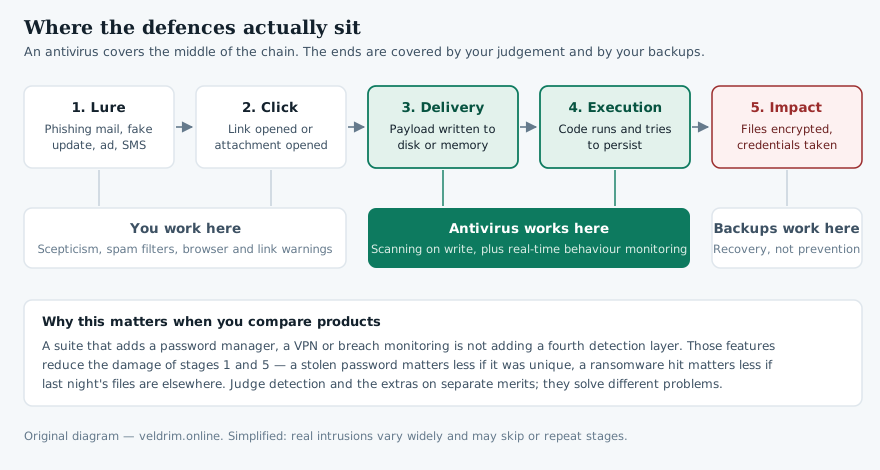
This is not an argument against antivirus. It is an argument for knowing what you have bought, and against the belief — genuinely dangerous — that a subscription makes you safe to click on anything.
Norton AntiVirus Plus
Norton’s entry paid tier: malware, ransomware and phishing protection for a single device, with a password manager and a small cloud backup quota. Current pricing and the features available in your country are shown on Norton’s own page.
See Norton’s current offerPartner link → norton.comPartner link. If you subscribe after following it, BARABAS AVLST s.r.o. may earn a commission from the advertiser. The price you pay is the same either way.
Real-time protection versus scans
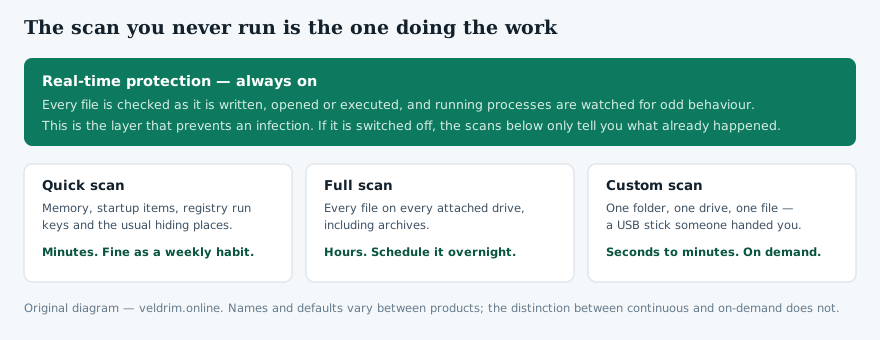
New users often equate "running the antivirus" with starting a scan. In practice the scan is the least important part. Real-time protection — the continuous checking of files as they are written, opened and executed — is what prevents an infection. A manual scan mostly confirms a state of affairs that already exists.
That said, scans have their uses. A quick scan of memory, startup entries and the common hiding places takes a few minutes and is a reasonable weekly habit. A full scan reads every file on every attached drive, takes hours, and is worth scheduling overnight once a month or after any incident. A custom scan on a single folder is the right tool for a USB stick somebody handed you.
What Norton AntiVirus Plus includes
Here is the entry tier as Norton itself lists it, read from the company's product page on 21 September 2026. Everything in this list is quoted from the vendor; nothing in it is our inference.
| Item | What Norton states |
|---|---|
| Devices covered | One PC, Mac, tablet or phone |
| Core protection | Antivirus, malware, ransomware and hacking protection |
| Scam Protection | Included; an AI-assisted feature aimed at scam texts and messages |
| Deepfake Protection | Included, but heavily conditional — see the note below |
| Password manager | Included |
| Cloud backup | 2 GB, and only on Windows (not Windows in S mode, not Windows on ARM) |
| Virus Protection Promise | Included, subject to Norton's own terms |
| Money-back guarantee | 60 days, per Norton's published terms |
The Deepfake Protection entry deserves the caveat spelled out, because it is the kind of headline feature that reads as universal and is not. Norton's own footnote states that it works only on English-language videos on supported platforms, requires Windows 11 or later and a supported browser, and that automatic detection additionally needs either an AI PC with an eight-core Qualcomm or Intel processor and 16 GB of RAM, or a non-AI PC with a six-core processor and 16 GB of RAM. On lower-specified machines only manual scanning is available. If you are on a Mac, on Windows 10, or on a modest laptop, this feature is not something you are buying.
What it does not include
This is where most of the misinformation about this product sits, including in an earlier version of this very article — see Corrections. Three things are commonly, and wrongly, attributed to Norton AntiVirus Plus:
- It is not a multi-device subscription. The entry tier covers one device. Coverage for several devices means moving up to a Norton 360 tier, or buying additional seats.
- It does not include dark web monitoring. On Norton's current listing, breach and dark web monitoring begins at the multi-device Norton 360 tiers, not here. Monitoring is also described by Norton as unavailable in some countries and varying by region.
- It does not include a VPN. That, too, starts at the Norton 360 tiers.
Two further limits are worth knowing. The cloud backup is Windows-only, so a Mac buyer is paying for a quota they cannot use. And the quota at this tier is 2 GB — enough for documents and a modest photo selection, not for a photo library.
Cloud backup and ransomware
The reason a security vendor bundles backup at all is that backup is the only defence that still works after every other one has failed. If ransomware encrypts your files and you hold an intact copy somewhere the malware could not reach, the attacker has nothing to sell you. Paying the ransom, incidentally, is a poor bet in its own right: there is no mechanism that obliges a criminal to hand over a working key, and plenty of cases in which none arrives.
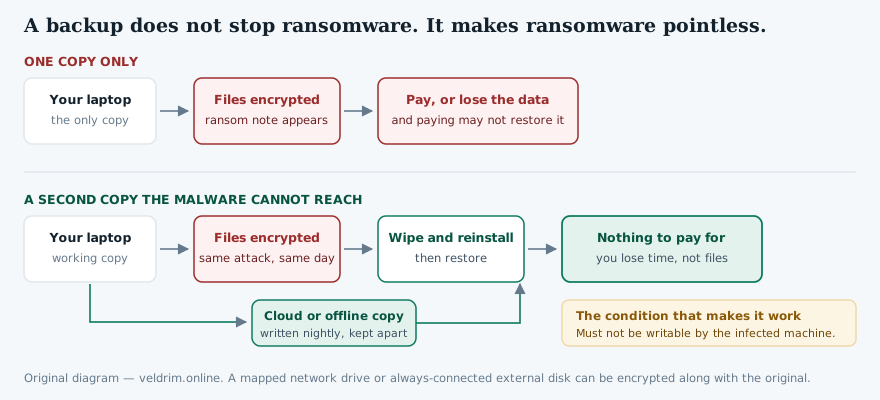
Two practical points follow. First, 2 GB is a starter quota; treat it as cover for documents, not as your whole backup strategy. Second, if you already pay for cloud storage or run a versioned backup, the bundled quota adds little, and that changes the value calculation for the whole subscription.
The password manager
Norton includes its password manager at every tier, including this one. It stores credentials in an encrypted vault, generates strong unique passwords, and fills them through browser extensions. It is a competent tool, and password reuse is genuinely one of the largest sources of avoidable harm to ordinary users — one breached site becomes twenty compromised accounts.
Be aware, though, that Norton Password Manager has also been offered as a free standalone product, and that the browsers you already use, along with several well-regarded independent managers, cover the same ground. Its presence in the bundle is a convenience rather than a reason on its own to subscribe.
Check what is included in your country
Tier contents, quotas and prices differ between Norton’s national storefronts. The figures in this article were read from the US listing; the offer page will show what applies where you are.
Open the Norton offer pagePartner link → norton.comPartner link. If you subscribe after following it, BARABAS AVLST s.r.o. may earn a commission from the advertiser. The price you pay is the same either way.
Performance
The old complaint about security suites — that they turn a working computer into a slow one — is much less true than it was, for two reasons. Engines now push a large part of the classification work to the vendor's servers rather than doing it locally, and ordinary laptops have far more memory and far faster storage than when that reputation was formed.
Where an impact remains visible, it is usually during a full scan on an older machine with a mechanical hard drive, or during the first scan after installation, when everything on the disk is being read for the first time. On a current laptop with an SSD, day-to-day use is generally unaffected. Independent labs publish performance scores alongside protection scores precisely so that this can be compared between products rather than argued about; see the next section for how to read them.
Reading independent lab tests
Three independent laboratories test consumer security products on a regular published schedule: AV-TEST, based in Germany; AV-Comparatives, based in Austria; and SE Labs in the United Kingdom, a more recent entrant. Their reports are free to read and are a far better guide than any review, including this one.
A few cautions on using them. Scores move between rounds, so a single month's result proves little; look at the trend over a year. Protection, performance and usability (that is, the false-positive rate) are scored separately, and a product can be excellent at one and mediocre at another. The tests cover the detection engine, which as noted is shared across a vendor's tiers — so a strong score for a vendor's flagship suite tells you about the engine in its cheapest tier too. And most testing is done on Windows; Mac and mobile results are published less often and on smaller samples.
Norton's products have generally performed well in these tests over a long period. We are deliberately not quoting a score here: any figure we printed would be from one round of one lab and would be out of date before you read it. Go to the labs' own current reports, which are linked under Sources.
Is the protection built into Windows enough?
For some people, yes — and an advertising-funded page that failed to say so would not be worth reading.
Microsoft Defender Antivirus ships with Windows 10 and Windows 11, is enabled by default, updates through Windows Update, and has for several years scored competitively in the same independent tests described above. macOS similarly ships with Gatekeeper and XProtect, and the platform's app distribution model reduces exposure further. Neither is invulnerable, but neither is the placeholder it was a decade ago.
The honest case for paying, then, rests on the extras and the handling rather than on a claim that the built-in protection will let malware through. You may want the bundled backup and password manager in one subscription with one renewal date. You may want a vendor with a support line. You may want features the platform does not offer, such as scam message filtering. You may be equipping a relative who will never configure anything and for whom a single dashboard that says "you are protected" has real value. Those are reasonable reasons. "Windows has no real antivirus" is not one, and anybody telling you otherwise is selling something.
Price, renewal and the guarantee
We are not going to print a price. Consumer security is sold with steep first-year discounts that vary by country, by currency, by campaign and by the day you happen to look, and any number here would be wrong for most readers. Two structural points do hold across the category, though, and they are worth more than a number.
Check the renewal price, not the introductory price. The advertised figure is usually a first-term discount. The price that applies from the second term is typically a good deal higher, and subscriptions in this category renew automatically by default. Whatever you buy, note the renewal date and the renewal amount when you buy it.
Know your cancellation rights. Norton publishes a 60-day money-back guarantee on the annual subscriptions listed on the page we consulted. Separately, and independently of any vendor promise, consumers buying at a distance within the European Union have a statutory right of withdrawal under the Consumer Rights Directive — though for digital content supplied immediately, that right can be waived by your express consent at the point of purchase, which is what the checkbox at checkout is usually asking for. Read the vendor's own terms; they govern.
Choosing a tier
Strip out the marketing and the decision comes down to two questions: how many devices need covering, and whether you will actually use the services that the higher tiers bundle.
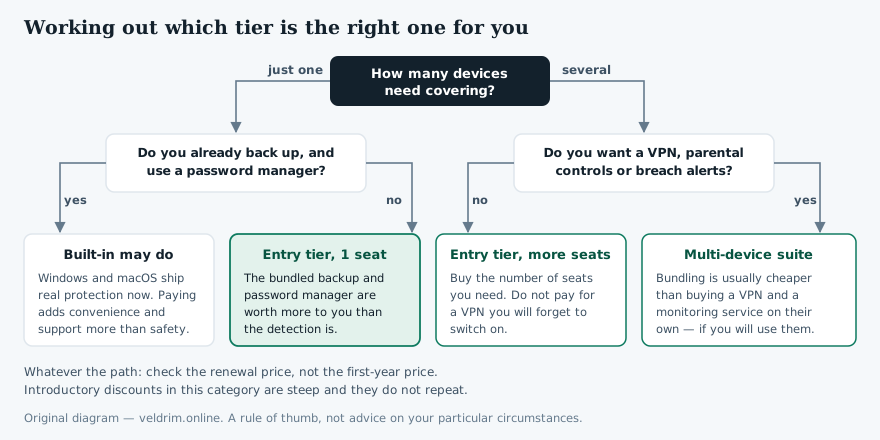
The trap in this category is buying a bundle for one feature you want and four you will never open. A VPN you do not switch on protects nothing; parental controls you do not configure filter nothing. If exactly one item in a higher tier appeals to you, price that item on its own before you pay for the tier.
The six habits that matter more
Antivirus is one line of defence among several, and it is the only one on this list that costs money.
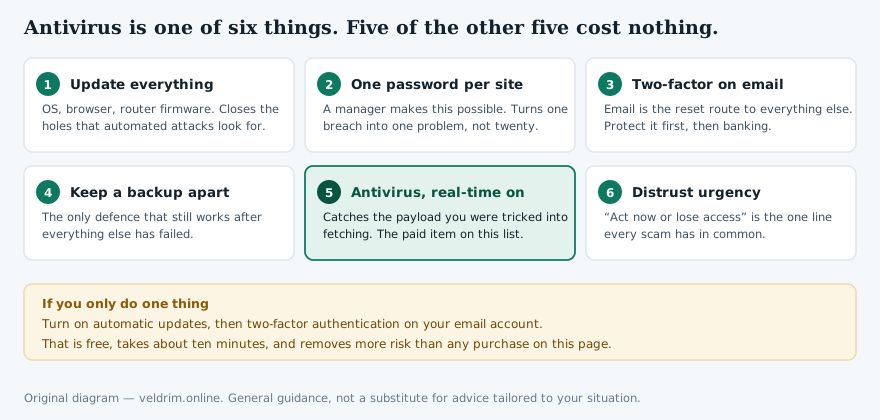
Email deserves special mention because it is the reset route to everything else you own. An attacker with your mailbox can request a password reset almost anywhere. Two-factor authentication on that one account is free, takes about ten minutes, and removes more risk than any subscription on the market.
Who it suits, and who it does not
It suits someone with a single Windows PC who does not currently back up, does not use a password manager, and would like all of that handled under one renewal with a support number to call. It suits people equipping a less technical relative, where a single clear dashboard has value beyond its features. And it suits anyone who simply prefers a dedicated security product to relying on the operating system, which is a legitimate preference even if the test data does not compel it.
It suits less well someone with several devices — the tier covers one, and the arithmetic of extra seats usually favours a multi-device plan. It suits Mac users less well than the listing implies, since the backup quota is Windows-only. And it adds little for anyone who already runs a proper versioned backup and an independent password manager, because the bundle's value is largely in exactly those two extras.
We earn a commission if you buy through the links on this page and nothing if you do not. We have nonetheless told you that the built-in protection in Windows and macOS is adequate for some readers, that three widely repeated features are not in this tier, and that the flagship deepfake feature will not run on most machines. That is the standard we hold ourselves to. If you conclude from this article that you should not buy, the article has done its job.
If the entry tier fits your situation
Norton's own page carries the current price, the renewal terms, the guarantee and the feature list that applies in your country. Read the renewal price before you commit.
Go to the Norton offer pagePartner link → norton.comPartner link. If you subscribe after following it, BARABAS AVLST s.r.o. may earn a commission from the advertiser. The price you pay is the same either way.
Corrections to an earlier version
An earlier version of this page, published before the site's editorial rules were adopted, contained claims that were wrong or unsupported. They are listed here rather than quietly deleted, as our corrections procedure requires.
- Device coverage. The earlier text said the subscription covered Windows, macOS, Android and iOS devices from a single subscription. Norton AntiVirus Plus covers one device. Corrected.
- Dark web monitoring. Described as included. It is not part of this tier on Norton's current listing. Removed.
- Cloud backup. Stated as 5 GB. Norton lists 2 GB for this tier, Windows only. Corrected.
- An invented statistic. The earlier text asserted that "the average home user is hit by at least one serious threat attempt every week". We can find no source for that figure and it appears to have been fabricated. Removed with no replacement.
- Lab testing history. The earlier text implied that AV-TEST, AV-Comparatives and SE Labs had all been testing Norton "for over two decades". SE Labs is a considerably more recent organisation. Corrected.
- Unsupported superlatives. Claims that the product was "one of the most widely recommended" and that independent labs "consistently score Norton among the highest", together with "join millions of users who trust", were unverifiable marketing language. Removed or replaced with a pointer to the labs' own reports.
- Fake framing. The page was presented under a "Reader Stories" heading and described in the footer as a "reader-submitted story". It was neither. That framing has been removed from the entire site.
Sources
- Norton, "Norton AntiVirus Plus" product page, us.norton.com. Source for the device count, the 2 GB Windows-only cloud backup, Scam Protection, the password manager, the 60-day money-back guarantee, the Virus Protection Promise, and the Deepfake Protection platform and hardware footnotes. Consulted 21 September 2026.
- Norton, tier comparison and feature footnotes on the same page. Source for the statement that VPN and dark web monitoring begin at the multi-device Norton 360 tiers, and that monitoring availability varies by country. Consulted 21 September 2026.
- AV-TEST Institute, av-test.org — independent, regularly published protection, performance and usability scores for consumer Windows, macOS and Android security products.
- AV-Comparatives, av-comparatives.org — independent real-world protection, malware protection and performance tests.
- SE Labs, selabs.uk — independent endpoint protection reports.
- Microsoft documentation on Microsoft Defender Antivirus, learn.microsoft.com — for what ships enabled by default in Windows 10 and Windows 11.
- Directive 2011/83/EU on consumer rights — for the statutory right of withdrawal on distance contracts and the conditions under which it is waived for digital content supplied immediately.
Where anything on this page diverges from the information published by Norton or by Gen Digital Inc., the publisher's own information prevails. Product tiers, quotas, feature availability and prices change without notice and differ by country. If you spot an error, write to info@veldrim.online and we will correct it and log the correction on this page.
Trademark notice. Norton is a trademark of Gen Digital Inc. or its affiliates. veldrim.online and BARABAS AVLST s.r.o. are not affiliated with, endorsed by, sponsored by or otherwise connected to Gen Digital Inc., Microsoft Corporation or Apple Inc. Product names are used solely to identify the products discussed. All diagrams on this page are original work created for this article by veldrim.online; no vendor screenshots, logos or product photographs are reproduced anywhere on this site.